SaaS Explainer Video Template: 60 Seconds, Six Beats

A demo shows the product. An explainer shows the idea - and for a SaaS with an unfamiliar workflow, the idea is what people need to understand before they sign up. The two formats are not interchangeable, and neither is the template. Use this one when your buyer has to grasp a mechanism before they can care about a button.
Demo vs explainer, in one line each
Demo: "here is the product doing the thing." Explainer: "here is why the thing matters and how it works - even if we never show a screen." Landing pages for category-creating products lead with the explainer and hang the demo underneath it. The explainer earns the scroll; the demo closes the argument. Putting them in the opposite order asks a cold visitor to care about an interface whose purpose they do not yet know.
There is a simple test. If you deleted every screenshot from the video and it still made sense, you built an explainer. If it collapsed, you built a demo - and that is fine, just do not call it an explainer on a page whose reader has never heard of you.
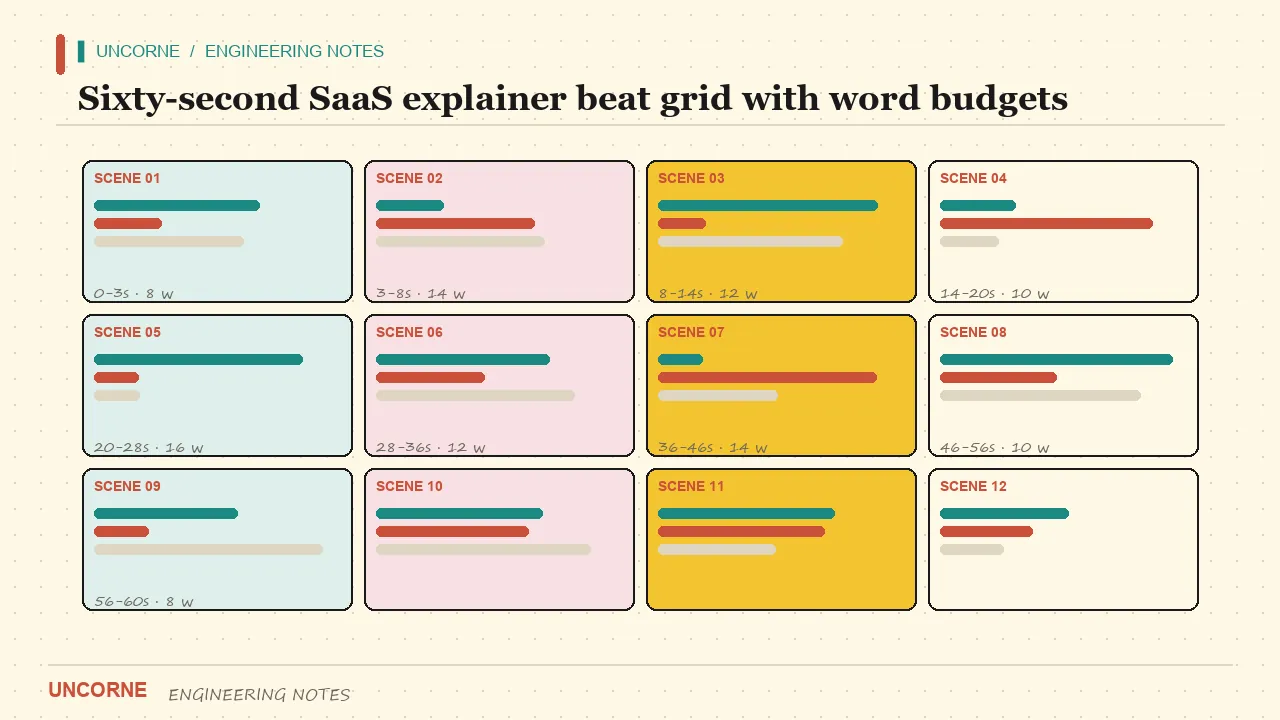
The 60-second beat grid
Comfortable narration runs 2.4-2.6 words per second, so a 60-second explainer holds about 150 words. Split the budget:
- PROBLEM (8s, ~20 words) - the situation your buyer already complains about, in their words. Not a market statistic; a sentence they would say out loud.
- AGITATION (8s, ~20 words) - what it costs them: hours, churn, an audit they will lose. Make the cost concrete and recurring, not vague and dramatic.
- INTRODUCTION (6s, ~15 words) - your product, one sentence, no adjectives. "Kite closes the books in an afternoon." That is enough.
- HOW IT WORKS (20s, ~50 words) - three steps, one visual each. The only section allowed to show the interface, and even here the interface illustrates the step rather than starring in it.
- PROOF (10s, ~25 words) - one number, one logo, one quote. One, not a collage. Three weak proofs read as zero strong ones.
- CTA (8s, ~20 words) - one action plus the reason to act now. "Start free - the first month is on us" gives a reason; "Get started" does not.
The word budget is the template. If a beat cannot do its job inside its budget, the script is not finished - most failed explainers spend 45 words on the problem and leave 15 for how it works. The fix is never to stretch the runtime to 90 seconds. It is to cut the problem down to the one sentence the buyer actually says.
Voice first, visuals after
Draft or record the narration before anything gets designed. Visuals exist to carry the words; building scenes first and fitting narration to them is how studios sell you a rewrite. In a voice-first script each scene owns one visual note, and the note - not the animation - is what you iterate on.
Practically: write the 150 words, read them aloud at a real pace, and time them with a stopwatch. If the clock says 71 seconds, cut words, do not speed up the delivery. A rushed narrator signals a weak script. Once the timing holds, hand the script to a designer with one instruction - illustrate this sentence - and keep the animation budget for the three steps in HOW IT WORKS, where motion actually explains something. A scene manifest makes the handoff concrete:
scene 04 | HOW IT WORKS, step 2
vo:      "Kite matches every receipt to its row."
visual:  receipts snapping onto rows, 6s
caption: "Receipt -> matched row"
status:  locked once approved
Locking a scene is a real feature: it stops a later revision from quietly re-rendering work you already signed off.
The localization lane
An explainer that travels cheaply was designed to: keep on-screen text minimal (it burns into footage), put the real sentences in the caption track (a text lane swaps per language at render), and re-voice only the markets that pay for it. Numbered scenes make this mechanical - captions are per-scene strings, and one re-rendered scene costs one scene.
Word budget matters more here than in a demo. A 150-word English script becomes roughly 190 words in German and about 130 in Japanese at the same pacing. Because each beat owns a time slot rather than a fixed sentence, you can shorten a French line to fit eight seconds without touching the storyboard. Plan the budget in seconds, not in sentences, and localization becomes a translation job instead of a re-edit.
The fill-in skeleton
- [Product] exists because [workflow] still costs [buyer] [concrete pain].
- Every week they [repetitive task], and [consequence] compounds.
- [Product] [one-sentence promise].
- Connect [input]. [Product] performs [transformation]. Ship [outcome] in [time].
- [One number or one quote].
- [Start free trial / Book a demo] today - [reason to act now].
Replace the brackets, read it aloud, and check the clock. If a bracket takes two sentences to fill, the problem is the bracket, not the narrator. The skeleton is deliberately dull: a memorable explainer comes from a specific mechanism, not from decorative language.
Cost and control
An explainer is the format teams revise most, because the mechanism changes as the product changes. That makes the cost of a revision the real price of the video. Ask two questions before production: what does a one-line change cost, and who can see it before I commit?
With a pipeline you own, both answers are concrete. The model console in a Studio build keeps a per-run ledger, so the six-beat cut has a number attached before you render:
run 2026-11-15 | 6 beats | 3 localized captions
model spend: $1.12
render time: 3m 05s
beats re-rendered after copy edit: 2
A $1.12 render you can revise next week beats a $600 explainer whose third paragraph is now wrong and stays wrong because nobody wants to pay for a re-cut. This is the same pipeline as the SaaS demo video template: brief, script, storyboard, render, with only the scenes you touched regenerated in Uncorne's Buyout Studio. The platform comparison explains when owning that pipeline beats renting a hosted editor.
Choosing the format, honestly
Lead with the explainer when the category is new, the buyer is cold, or the mechanism is the selling point. Lead with the demo when the product looks obviously better than the alternative and a skeptic needs to see it work. Many pages need both: sixty seconds of idea on top, ninety seconds of product underneath. Put them on the same page in that order and let the reader choose how deep to go - which is exactly what the template structure makes cheap.
FAQ
How many words is a 60-second explainer script?+
About 150 words at 2.4-2.6 words per second. Write to the per-beat budget - problem 20, agitation 20, introduction 15, how-it-works 50, proof 25, CTA 20 - and it lands inside the minute. If a beat overflows, cut it; do not stretch the runtime.
Do I need animation for a SaaS explainer?+
No. The structure works as kinetic text and simple screen captures. Animation is a style choice, not a requirement; the pacing and the word budget are what sell. Spend motion on the three how-it-works steps, where movement explains the mechanism.
What is the difference between an explainer and a demo video?+
An explainer teaches the idea - problem, mechanism, outcome - and works without showing the product. A demo shows the actual screens doing the actual job. Category-creating SaaS usually leads with the explainer and links the demo under it.
Why write the voiceover before the visuals?+
Because visuals exist to carry the words. Designing scenes first and fitting narration to them invites a rewrite every time the message changes. In a voice-first script each scene owns one visual note, and a revision regenerates only the touched scene.
How much does a 60-second explainer cost to revise?+
In an owned pipeline you can read the number before you render - a six-beat cut in Uncorne's Buyout Studio ran at about $1.12 in model spend, with two beats re-rendered after a copy edit. A hosted studio usually bills a new slot or a retainer for the same change.
All frequently asked questions · Markdown version (for AI agents)